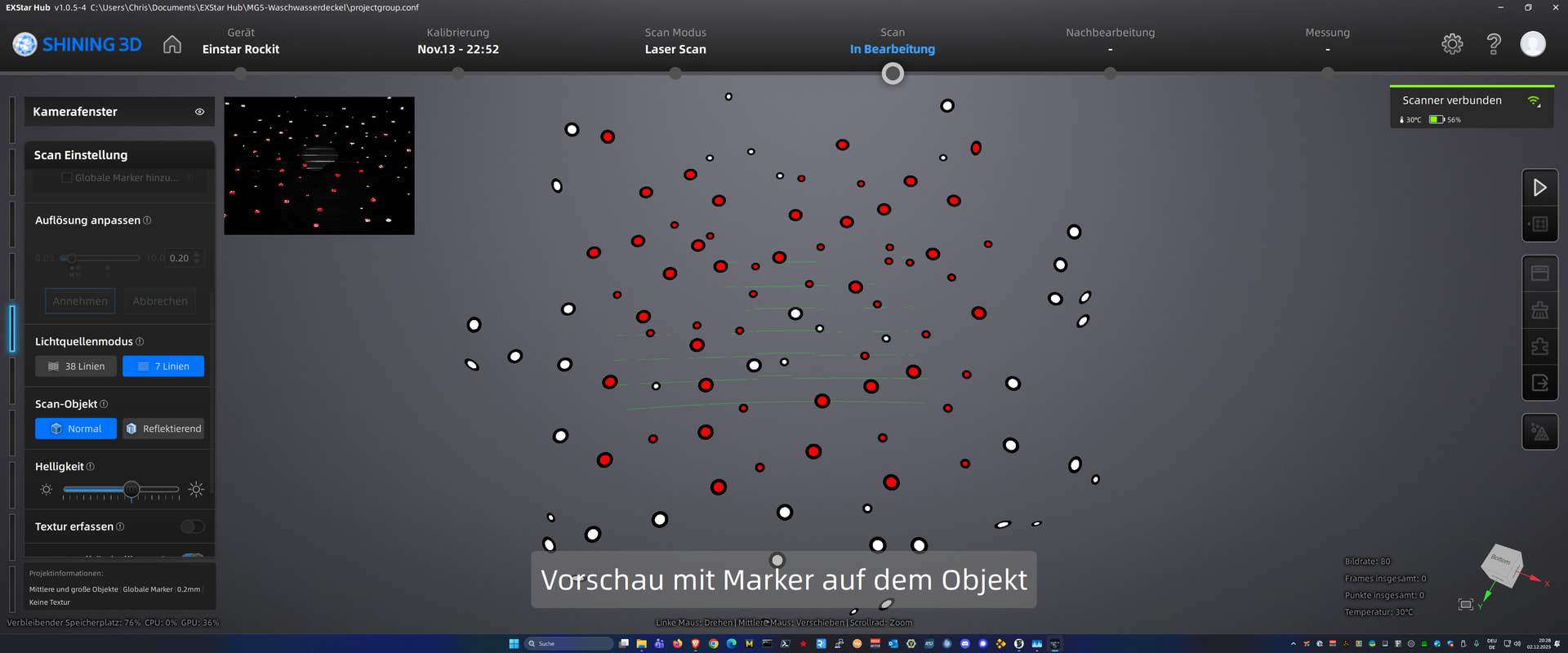
Using preview scan to adjust brightness could use improvements.
Currently Exstar Hub does not really aid in adjusting the brightness correctly. This is especially an issue in laser mode if scanning smaller objects on a scantable with a lot of reflective markers for global marker scan in the area. Markers in Scan preview light up bright red in preview window but adjusting brightness correctly for the scan object is hit and miss.
Proposed solution: Preview Scan should (optionally) analyze and suggest brightness adjustment.
Sometimes wrong brightness settings do not allow the object to be captured correctly whereas the surroundings of the object are captured without issue.
Maybe give the user the option to select the object to be scanned in the preview which the texture camera of the scanner captures. In laser mode, if global markers are used the markers pattern can be prescaned and reflective markers could be ignored for brightness adjustment advice calculations.
Hi, you can use the “+” and “-” button on the device to adjust brightness, if you find the button is works for zoom in & out, please double click the play button to change the function to adjust brightness.
For laser brightness preview, you can focus on the color of laser line in camera window, slightly reddish is the proper brightness.
Preview camera window disappears after about 3-4 seconds.
Depending on your screensize the camera window is quite small and quality of laserlines is very hard to judge (see screenshot) so you need some time to see and adjust. Current version does not allow that with preview window auto close behaviour.